PanelTime™ — Record. Convert. Get Paid.
Your timesheet — handwritten or typed — converted and ready to upload to eVoucher. Upload a photo, scan, or PDF of your time records and PanelTime™ reads every entry, sorts it into the correct CJA service categories, and hands you a clean file ready for eVoucher import. Works with Word, Excel, Google Docs, Google Sheets — just export to PDF.
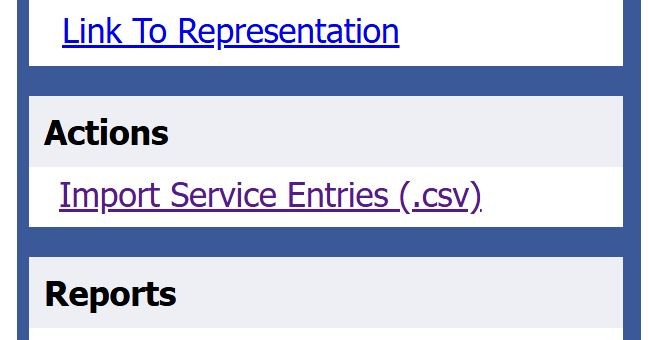
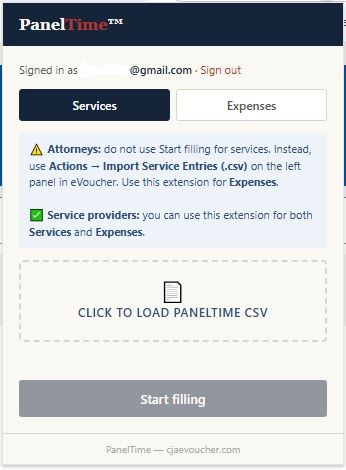
⚡ Then upload all entries to eVoucher in one click — via the import button or Chrome extension.


Convert a timesheet First 3 free
Your first three conversions are free — just enter your email below, no card required. Upload a PDF or photo of your timesheet — handwritten or typed. Review and edit every row before exporting.
For the cleanest results, use our free timesheet templates — CJA-20 Attorney (PDF) or CJA-21 Service Provider (PDF) — designed for easy printing and legible data entry. Or skip the paperwork entirely with our all-in-one billing solution.
⚠️ Using your own timesheet? Here's what it needs to have →
Drop your timesheet here or click to browse
PDF, JPG, or PNG · one client matter per file
Scan this QR code with your phone
Take a photo of your timesheet — it will appear here automatically.
Waiting for photo…
3 free conversions per email. We'll send occasional product updates — unsubscribe anytime. Unlimited conversions with a subscription.
No passwords to remember. Just enter your email — we'll send a quick verification code and you're in!
Check your email for a 6-digit code
We sent a code to . Enter it below.
Code expires in 10 minutes. No code yet? Please wait up to 5 minutes.
| Date | Hours | Description | Service Type | Doc.# | Pages | Remove |
|---|
Handlebill™ — your all-in-one billing tool for CJA cases.
- Track time by voice, timer, or taking a picture with your phone
- PanelTime™ converter built-in
- Calendar view of hours worked and upcoming court dates
- Export court dates to Google, Apple & Outlook calendar
- One-click eVoucher billing via free Chrome extension
- Automated SMS reminders for you, client, and family
How it works
Works for both CJA‑20 (Attorney) and CJA‑21 (Service Provider) vouchers. Upload your timesheet — PanelTime™ reads the entries and hands you a file ready for eVoucher.
Upload your timesheet
Snap a photo, scan, or export a PDF from Word, Excel, or Google Docs. Multi‑entry pages are read top to bottom.
Review the entries
Every date, time value, and category is editable. Ambiguous entries and expense lines are flagged, never silently guessed.
One click — all entries upload to eVoucher
How you upload depends on your voucher type — see below. No manual typing. No copy-paste. Just done.
Handlebill™ — your all-in-one billing tool for CJA cases
Track time, record time by voice dictation, calendar view all cases, save and export CSVs, bill with one click of a button. Free for 7 days, no credit card required.
Two ways to use PanelTime™
PanelTime™ Chrome Extension is included free with both plans.
Monthly subscription — no case tracking or billing history.
- 3 free conversions to start
- Unlimited conversions with subscription
- CJA‑20 and CJA‑21 support
- Editable review table + CSV export
- One-click upload via import button or Chrome extension
Your all-in-one billing tool — track time, voice dictation, case management, and one-click eVoucher upload.
- Everything in Converter, plus:
- Add your hours with AI voice dictation
- Add hours with a built-in timer
- Track exact service time (e.g. 10:45am to 11:03am)
- eVoucher category assigned automatically — eVoucher recognizes it on upload
- Track and upload expense receipts
- Automated SMS court date reminders
- Analytics — see how much you bill
- CJA fee cap tracker — CJA-26
- Works with your private cases too — generate invoices
- Upload to eVoucher in a few minutes with one click
Pricing and plan options are subject to change. Subscribers will be notified before any price increase takes effect. Cancel any time from your account page.